Context Engineering in Practice
Documentation hierarchy, code navigation, and agent memory
very token spent reading irrelevant code is a token not spent understanding the relevant code, and increases the odds of wrong choices. Every fact an agent fabricates is a fact it failed to look up. So somebody named this dark art of trying to figure the exact intent and material for LLMs this fancy new name, Context Engineering. How I see it is that it's about assembling the right information for agents at the right time. Arguably it is both a good token-saving strategy and effective quality enhancer.
The framework in earlier chapters established the principles: architecture constrains the solution space, specifications narrow what agents can produce, and tokens have real costs.
This chapter is about how to set up your project so agents can actually find what they need.
Ground truth: The documentation hierarchy
As we've learned before, software engineering is much more than code. Consider the Inner Circle and Outer Circle metaphor in Chapter 6. Different agents need different kinds of truth at different times, and confusing these leads to either information overload (agent receives everything, attends to nothing) or information starvation (agent guesses because it cannot find the answer).
Three tiers
One way to organize the information relevant to development is to think of it on three tiers:
| Tier | Contains | Where It Lives | When Loaded | Update Frequency |
|---|---|---|---|---|
| Project-level | Conventions, stack, architecture | CLAUDE.md, ADRs, convention files | Session start | Rarely (per decision) |
| Task-specific | Stories, criteria, scope, patterns | plan.json, tasks.json, specs | Task start | Per story |
| Tracking | Status, gates, history | Task tracker, status files | On demand | Continuously |
Project-level truths
Here, facts are always true regardless of the current task. These include general architecture, technology stack, coding conventions, naming rules and error handling patterns. They live in files like CLAUDE.md, copilot-instructions.md, conventions documents, and architecture decision records. They rarely change per feature. Ideally they should be loaded at session start and referenced throughout the cycle. But perhaps not: the black-box testing agent might not need to know that much on how the thing works under the hood, but what it is supposed to do, right? It might benefit from detailed testing practices, such as finding or curating proper test data or mocking.
This level of information should be curated first when you start. In small and simple projects, a single document can actually be enough. Just keep it up to date.
Once the thing gets more complex, you cannot and should not put all the things into a single file. Roughly speaking, the further down the standard project context file (such as CLAUDE.md) your principle, rule, or practice is, the less likely it is to be actually followed.
The key is that project-level documents remain compact and current. Stale documentation is worse than none at all, because agents trust what they read. It also leads to token waste, which quickly turn into hallucinations. This is information always appended regardless of what you do. The model will treat it as ground truth and ignore what you say in conversation. Keep your AGENTS.md, CLAUDE.md etc short, up-to-date and relevant for all the workers in yout factory. Do you think your frontend testing agent cares about what kind of database you use? It doesn't and it shouldn't. So don't mention it.
Task-specific truths and style guides
These are facts that describe the current unit of work i.e. task.
I learned that a good setup for this tier is a structured specification for each story or task, including the functional requirements, architectural constraints, and coding practices relevant to that specific piece of work. For example, a story specification might include: Most of it could be just a recurring checklist and a index of references, like a list of designs, examples, patterns. Not every things needs to be on pseudocode level.
| Category | Examples | Role |
|---|---|---|
| Functionality | Stories, acceptance criteria, test cases, business rules | What to build |
| Architecture | Stack specs, module boundaries, dependencies, API contracts | How to build it |
| Advisory | Style guides, error handling patterns, reference implementations | The style to build it in |
This kind of information is stored in for example plan.json, tasks.json, story specifications, and linked design documents. Agents load them at task start as instructed, like 'Plan user story 25422'. They form the primary execution context: the instructions the agent actually follows. Or should.
Tracking and workflow truths
Short-lived status information, which is not part of the delivery but a development-time concern, should be stored separately from the 'truths'.
This includes metadata about progress and state, how the bigger things have been broken down into digestible chunks, and what has been done to them. Think task status, gate positions, change history, readiness states, review notes and whatnot.
You may have some of this information linked to your corporate backlog/ticketing system. gets stuck.
I'd steer clear of syncing tickets with Jira and the like during implementation. It's usually enough when something is ready for UAT or gets stuck, not how it's proceeding moment to moment. Instead, treat tickets as a communication channel for PM's and PO's (do we still have those? or Scrum masters?) and the structured planning and tracking files as the execution context for agents.
Agents query them on demand to make workflow decisions, preferably via a good tool and not directly by altering files. Imagine needs such as 'What's left to do', 'What are the active tasks', 'Let me see the plan for this task again'. Needless to say, only the relevant parts of this need to be loaded in the context when executing something.
Indexing, selecting, finding
For token-effective context management, as I suggested by the tiered approach in the previous Sections, the first rule of thumb is to not dump everything into a single context file.
So one method I've found pretty good is to organize your documentation into thematic chunks and access them from a compressed index (see Compressed Index pattern in Chapter 10). It means configuring your agents to seek what they need on-demand rather than pre-loading everything up front. A good index gives pointers to question "where should I look?" without containing all the answers itself.
Sample index structure
I provided an example from a real, large project where we are using Compressed Indexes below.
The copilot-instructions.md file contains the project-level instructions. Instead of embedding all the details, it references an INDEX.md that maps short keys to specific documentation files.
Each agent is configured to embed only the keys relevant to its task to fetch the detailed context on demand rather than browsing the entire document tree.
To illustrate the examples and ideas above, check the image below to find mappings between agents and indexing. The project instructions (the 'always true' ground truths) reference the INDEX.md, which maps to specific documentation files. Each agent embeds only the keys it needs to fetch detailed context on demand.
The "Lost in the middle" problem -- do models actually work like us?
Let's imagine you are renovating your bathroom.
Before getting it done, you've had a long, winding, back-and-forth discussion with a renovator about options: tiles, colors, cabinets, and whatnot. As you guessed, nothing is properly on paper, at least not up to date.
Then you make a verbal contract with him to renovate your bathroom. What are the odds he'll do what you wanted unless you keep very close tabs on what he's up to?
Let's consider this in the context of AI agents and getting a simple thing right, like what is the value of X.
In the example above, for the model to reliably always say that X=4, it would need to work strictly start-to-end on the context and correct itself. That would mean everything later automatically overrules what was said earlier. This is not feasible for several reasons: the high priority for things early in the context is there by design. Otherwise, project ground truths (and the hidden system prompts) wouldn't be followed.
Too much detail and conflicting advice turn into bad results. AI model attention mechanisms have been tuned to prioritize the beginning and end of the context. In a way, it works like humans: you might remember how it all started and ended, but not so much about what happened in between.
So, coming back to your bathroom example, the renovator might remember the initial discussion about changing the tiles to red, but later you said green. He might very well be installing the red ones as we speak after juggling the options and the hardware store and deciding not to call you to clarify.
This is about probabilities, not black and white. You might get lucky that whatever greedy or probabilistic mechanism picks the next token gives you the last value of X, but you cannot depend on that. The model picks one of the values in the X=? set, and it's never 100% certain which. There's deliberate randomness in this.
Finally a couple tips:
Beyond documents: Navigating the codebase
How an agent searches code (or documents) determines how many tokens it spends and how grounded its output is.
In the early days of AI-assisted coding, you'd pick the files you wanted to edit or use first, then fire your prompt. Essentially you were the context engineer. Now that we're using agents, that's neither viable nor necessary, unless you decide to split tasks at code-file-level increments and micro-manage your agent tasks.
For all programmers it is pretty obvious that simple text searches do not capture the relationships between your code modules (files) very well. Think programming concepts like inheritance, macros, if-then-else constructs, and whatnot. It gets subtle; imagine you detect a relationship between two modules that one invokes a method on another. While that is a good observation, it might not be relevant to the case in hand at all.
What you need is something called semantic search. It is a more intelligent way to find the relevant information, and it can be implemented in different levels of sophistication. In a way the difference between text and semantic searches can be likened to reading every page of a book instead of using the index, cross-references and footnotes.
In the following, I dig deeper into this topic by looking at three levels of code search sophistication, from basic text search to indexed search to LSP-powered search.
Level 1: Text search (grep and find)
This is the naive baseline strategy you'll see if you look at the tool calls your agent makes. It's often just pattern matching on file names and file contents, perhaps with some synonyms thrown in. The larger the codebase gets, the more inefficient this becomes.
| Aspect | Details |
|---|---|
| Strengths | Universal, zero setup, works in any language, fast. Every CLI agent has access to text search out of the box. |
| Weaknesses | No semantic understanding. It cannot distinguish a function definition from a comment that mentions the function name. It cannot follow type hierarchies, resolve imports, or understand that `PaymentService` and `IPaymentService` are related. It returns noise. |
| When it is enough | Small codebases, unique identifiers, simple lookups where the string is distinctive enough that false positives are rare. |
| The failure mode | An agent greps for `handlePayment`, gets 47 matches across tests, mocks, comments, and the one actual implementation. It reads them all — burning tokens — and sometimes picks up patterns from the test mock instead of the real implementation. The agent does not know which match is authoritative. |
Level 2: Indexed search, the structural middle ground
A step up from text search: a tool that maintains a code graph. It knows where symbols are defined, what imports what, what calls what. Tools like Serena, tree-sitter-based indexers, and symbol databases fall into this category.
| Aspect | Details |
|---|---|
| Strengths | Structural awareness. It knows that `class PaymentService` is defined at file X line Y. It can answer "what imports this module?" or "what files reference this type?" It returns the definition, not every mention. |
| Weaknesses | Requires indexing infrastructure. The index may lag behind recent edits. It does not understand runtime behavior — it knows the static structure but not what actually executes. |
| When it shines | Medium-to-large codebases where text search produces too much noise. The index cuts through the noise by understanding code structure, not just text. |
Level 3: LSP, or how your IDE does it
The Language Server Protocol gives agents the same intelligence that powers VS Code, IntelliJ, and other IDEs: go-to-definition, find-all-references, type hierarchy, rename refactoring, signature help.
| Aspect | Details |
|---|---|
| Strengths | Full semantic understanding. It follows types through generics, resolves interface implementations, understands method overloads, and can trace execution paths through the type system. |
| Weaknesses | Language-specific — you need a server per language. Setup overhead is real. Not always available in CLI agent toolchains, though this is changing. |
| Current state | IDE-embedded agents (Cursor, Windsurf, GitHub Copilot) get LSP access for free — the IDE already runs the language server. CLI agents (Claude Code, aider, Codex) are catching up. Claude Code's MCP-based LSP integration is one example of bridging this gap. |
Summary
The previous can be summarized as in the table below. Perhaps the key lesson here is that the more accurate information you hand out or prepare right off the bat, the faster and more 'intelligently' your AI coding team will perform.
| Dimension | Text Search (grep/find) | Indexed (Serena, tree-sitter) | LSP |
|---|---|---|---|
| Setup cost | None | Moderate (indexer config) | High (language server per lang) |
| Semantic depth | None — literal text | Structural — symbols, imports | Full — types, interfaces, flows |
| Token efficiency | Low — returns noise | Medium — returns definitions | High — returns what is needed |
| Language support | Universal | Broad (tree-sitter grammars) | Per-language server |
| CLI agents | Default everywhere | Emerging | Limited but growing |
| IDE agents | Available | Often built-in | Built-in |
Confused? Don't worry. This is a lot to digest. I've had only limited success (especially with skills) getting the tools used systematically. Sometimes the agent just does whatever the hell it wants, totally against the instructions, but on a new session it acts perfectly.
I'll conclude here with a couple of practical tips to make your agents use the proper tools (like Serena):
- Have the absolute minimum set of tools available 2) Use the exact names of tools explicitly
- Start with a clean history and a fresh session
- Constantly debug and review the skill usage in fresh prompts without referring them directly by name. If they don't get picked up, re-visit your tool/skill description yet one more time.
Context composition: The assembly recipe
Finding the right information is half the problem. Assembling it into an effective context (in the right proportions, in the right order) is the other half.
The context budget
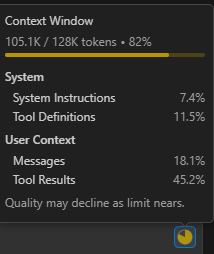
Treat the context window as a budget to allocate deliberately, not a bucket to fill:
| Category | Budget Share | Contains | Risk if Over-Allocated |
|---|---|---|---|
| Project conventions | 5-10% | CLAUDE.md, style rules, architecture | Crowds out task-specific detail |
| Task specification | 15-25% | Plan, acceptance criteria, scope | Leaves too little room for code |
| Relevant code | 40-60% | Module code, interfaces, examples | Dominates attention, may include noise |
| Reference/examples | 10-20% | Similar implementations, patterns | Agent may copy rather than adapt |
| Conversation history | 5-15% | Prior turns, corrections, decisions | Accumulates stale context (rot) |
The key insight: if code fills 80% of the context, the specification that tells the agent what to do with that code gets only 20% of the model's attention. Every piece of irrelevant code you load pushes the instructions further from focus. Budget deliberately.
Pre-loaded vs. on-demand context
Two strategies for getting information to agents:
Pre-loaded: give the agent everything it might need up front. Simpler to set up, no tooling required. Works for small tasks with predictable context needs. The risk: context bloat. When you pre-load "just in case," you fill the budget with material the agent may never need, crowding out what it does need.
On-demand (tool-based): give the agent tools to fetch context as needed. The agent decides what to look up (using grep, file reads, indexed search, or custom tools). This scales to large codebases where pre-loading is impossible. The risk: the agent may fail to look up what it needs, or waste tokens on dead-end searches before finding the right file.
Custom MCP tools can bridge the gap. Instead of generic "read file" tools, expose project-specific lookups: "get the API contract for service X," "show me the test patterns for this module," "what are the conventions for error handling?" These tools return exactly the right context for a specific question, without the agent needing to navigate the file system.
Limiting visibility: Constraining the search space
The best search result is the one you never had to filter out. Before improving how agents search, reduce what they have to search through.
Monorepos and multi-project codebases
A 500-package monorepo: the agent implementing a payment feature does not need the email templates, the admin dashboard, or the legacy migration scripts. But without scoping, every grep command searches all 500 packages, and every "find references" returns matches from code the agent should never have seen.
Scoping mechanisms exist in most agent toolchains: workspace configuration, .claudeignore patterns, context boundaries in agent configuration files. The key is using them proactively, not reactively.
This connects directly to Chapter 11's module boundaries: good architecture enables scoping. If payment and email are cleanly separated packages, you can hand the agent only packages/payment/ and its shared interfaces. If they are tangled in the same module, scoping is impossible without also untangling the code.
Search scope as a governance lever
The leash concept from Chapter 10 (defining what agents can and cannot do) extends naturally to information access. Scope is a leash on attention, not just on action.
- Exclusion patterns: "do not look in legacy/, vendor/, generated/, node_modules/"
- Inclusion patterns: "only look in src/features/payment/ and src/shared/types/"
- Functional scoping: "you are working on the API layer; the frontend is out of scope for this task"
The need-to-know principle
Start tight, expand on failure. If the agent says "I cannot find X," widen the scope. This is better than starting wide and hoping the agent filters: pre-filtered context is cleaner than post-filtered context, because the agent never sees the noise in the first place.
| Scope Level | Example Size | Token Estimate |
|---|---|---|
| Full repository | 500 packages | ~10M tokens (unreadable) |
| Scoped packages | 3 relevant packages | ~2M tokens (too large for one context) |
| Relevant modules | 8 modules | ~500k tokens (fits with compression) |
| Specific files | 15 files | ~50k tokens (effective working context) |
| Relevant functions | Key interfaces + implementation | ~5k tokens (surgical precision) |
Each scoping level is roughly an order of magnitude. The difference between a full-repo context and a scoped working context is the difference between a library and a focused briefing.
The case for indexed code navigation
Most agent harnesses still discover code the hard way: grep for a pattern, read the file, grep again, read another file. On a 79K-line TypeScript codebase, finding a single function definition with grep returns 40 matches across 19 files at a cost of roughly 1,500 tokens. A semantic search for the same thing returns 26 snippets at 4,000 tokens. Most of that output is noise.
An indexed code graph changes the economics completely. I ran a side-by-side comparison using a lightweight Rust-based indexer exposed via MCP. It keeps the entire codebase's symbol table, call graph, and dependency relationships in memory, so lookups are structural rather than textual.
Here is what a single indexed lookup actually looks like. The agent needs to find where apiResponseHandler lives and what it calls:
Input:  { "name": "apiResponseHandler", "include_body": false }

Output:
  file: src/utils/apiResponseHandler.ts
  kind: Function
  line: 57
  sig:  export function apiResponseHandler<T>(
  callees: [tryExtractErrorDetails, extractErrorMessage,
            ApiError, isValidEnvelope, isNotFoundError]
That is the entire response. 130 tokens. The agent now knows the file, the signature, and every function it calls, without reading a single file. A grep for the same symbol name returns 40 matches across 19 files at 1,500 tokens, and the agent still needs to read the file to get the signature.
Finding all references: 80 tokens instead of 800. Over a typical 15-query exploration session, the indexed approach used roughly 10,000 tokens versus 35,000 for the standard tools. That is a 70% reduction in context consumption for the same information.
| Task | Indexed lookup | Standard grep/search | Savings |
|---|---|---|---|
| Symbol definition | ~130 tokens | ~1,500 tokens | 91% |
| Find all references | ~80 tokens | ~800 tokens | 90% |
| Full body + dependencies | ~1,200 tokens | ~3,200 tokens | 62% |
| Complex navigation (chained) | ~1,500 tokens | ~4,500 tokens | 67% |
| File reading (compressed) | ~2,000 tokens | ~3,200 tokens | 37% |
The point here is not that one tool is better than another. It is that the default code navigation approach baked into most agent harnesses is remarkably wasteful. Every unnecessary token spent on finding code is a token not available for understanding and generating code. Tools like Serena (which exposes an indexed code graph via MCP) and CodeGraph (which builds a semantic knowledge graph for symbol lookup, call tracing, and impact analysis) represent a growing category of context augmentation tools that sit between the agent and the codebase, turning brute-force discovery into structured retrieval. Chapter 18 lists more of these in the tool ecosystem overview.
The default way agents discover code is the most expensive part of most sessions. Indexed, structural code navigation is not a nice-to-have; it is the single highest-leverage optimization for context efficiency.
Agent memory: Persistent context across sessions
The tool builders have heard our cries and moods, and figured it might be better to carry some lessons learned from session to session via so-called memories. Perhaps it is a kind of reinforcement learning, but either way, it can also lead to funny side effects as the memory is just another thing that gets or might get added and be up to date. Let's dig into that a bit more.
How agent memory works
Built-in memory tools. Some agents offer explicit "remember this" capabilities. Claude Code maintains memory files that persist across sessions. Cursor has context notes. These are the simplest form of persistent context: the agent or the user writes something down, and it is available next time.
Custom memory. Project-specific memory files, decision logs, and "lessons learned" that agents read at session start. More structured than built-in tools. These might capture architectural patterns that worked, common mistakes to avoid, or domain knowledge that is not in the documentation but emerged during development.
Conversation-derived memory. Summaries, key decisions, and corrections extracted from past sessions and stored for future reference. Some tools automate this; others require manual curation.
Practical memory patterns
- Keep memory files small and thematic. A conventions.md, an architecture-decisions.md, a lessons-learned.md, not one massive file that mixes everything.
- Version memory alongside code. If it matters enough to remember, it matters enough to track in revision control. Memory is part of the project, not the tool.
- Distinguish project memory from personal memory. Project memory (shared, in the repo) captures team-wide knowledge. Personal memory (tool-specific, per developer) captures individual preferences and workflow patterns. Conflating them creates confusion.
- Review memory files during retrospectives. They are a leading indicator of where agents struggle. If the memory file says "always check for null in the payment service," that is a signal the payment service has a design problem worth fixing.
The compound effect
In this chapter, I've discussed five key concerns for ensuring agents find what matters: documentation hierarchy, search technique, context composition, scope limits, and memory.
Applied carefully, they give your agents a much better fighting chance to one or N-shotting the task at hand without excessive iteration, or starting over.
Good docs with smart search, deliberate composition, tight scope, and curated memory minimize token usage and maximize grounding. Any one of these failing often undermines the others. For example, perfect architecture docs accessed with blind grep over all docs wastes tokens and gives too much context. A great LSP integrated into your flow on an unscoped monorepo still drowns in noise. Finally, clean context with polluted memory will drift toward abandoned patterns and incorrect assumptions.
In a way this is just information management, like an internal search engine. Perhaps this universal project semantic search could be implemented with a good product (and very well may be once things settle).
Spend time figuring out what kind of project-level truths, feature specifications and targeted instructions you have, and how they should be organized. Then set up your agents to find them on demand rather than pre-loading everything. Use indexing and scoping to limit the search space, and consider memory as a way to carry lessons learned across sessions.