The Framework in Practice
From theory to a running system: what we actually built, how it runs, and what we learned
he previous three chapters described governed delivery in the abstract: principles, pipeline mechanics, and architecture as probability management. This chapter shows what it looks like when you build one. This is not a cleaned-up demo, but the actual system, with its ten agents, its CLI-enforced gates, its skills library, and its warts.
My intent is not to provide a template you should copy, and I'm not going to publish these MD files and bash scripts on GitHub. Your stack, your team, your domain will produce different design decisions.
The system
To address a new promising project on an I-horizon (and, I hate to admit, from some kind of bizarre academic interest), I set out to build a multi-agent framework to help me and my team with the new challenge. I had my background already, but was still more or less in the single-developer sandbox (or a container), where my colleagues and I indeed used AI, but with no system -- let's say ad hoc.
Originally GitHub Copilot and VS Code was our target platform, but I soon extended it to work with Claude Code (and OpenCode et al.) to remain tool-agnostic.
This setup, which I still find growing and evolving each day, orchestrates AI agents through a gated workflow that mirrors the stages described earlier in this book. It covers the phases from requirements decomposition through planning, implementation, and testing, all the way to code review and pull requests.
Each phase is owned by a specialized agent, and transitions between phases are governed by validated gates.

The project context that this system was designed to support was a project to rewrite a large app in a new infrastructure and modern technology. There's a ticket system as the backlog and a CI/CD system. That context shaped many of the specific choices, such as certain skills, the ticket system integration, and the screen bootstrapper agent. I've also included and tuned various skills and agent templates from public sources, which I found useful in my work.
Anyway, the structural patterns I've put into place may be used in any project where you want governed AI delivery. An overview of the setup is depicted below.
Separation of concerns: Phase, helper, and meta agents
Chapter 10 outlined the agent roles a governed pipeline needs: roadmapper, planner, engineer, tester, reviewer. Here's how those roles materialized in practice. The system comprises ten agents divided into three categories: phase agents that own the workflow stages, helper agents that are used as delegates by phase agents for specialized work, and meta agents that operate across the pipeline rather than within a specific stage, and are more about the agentic system than the software project itself.
The Orchestrator
The Orchestrator is the central coordinator of the entire pipeline. It is a stateless router that inspects the current gate, validates prerequisites, and delegates to the correct phase agent. It never executes work itself but ensures that the right agent is activated at the right time based on the state of the task tracking system and the defined workflow.
In the end, once we've done our prework for a user story, and are about the start, it should be as simple as the following to get the system going:
Phase Agents
In our setup, the phase agents are designed to run a single workflow, typically a task that can be completed on a single run. To run engineering and testing tasks, such as 'implement API endpoint', we found it to be useful to have the agent spawn a separate session for the individual, atomic tasks instead of passing the entire list of 10-15 smaller steps.
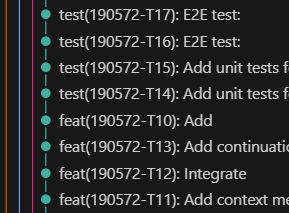
Atomic commits from the Engineering Agent's task breakdown
What I've found particularly nice about this small tasks approach is that the GIT history comes automatically rather self-descriptive, atomic and easy-to-revert, as each of the 'engineering' steps becomes a single commit.
On the left, I've provided an anonymized snapshot of a git history with a medium-sized user story with 20+ engineering and testing tasks. Each of these tasks was spawned by the Orchestrator to a specialist agent to run it, each with its own clean context and task specification stored in my task-tracking system.
Each phase agent owns a workflow stage for the task given by the Orchestrator and is responsible for driving it to completion.
| Agent | What It Does |
|---|---|
| Feature Initializer | Fetches PRDs, generates user story drafts, creates tracking entries |
| Planner | Reads user stories, analyzes legacy code, produces implementation plan with task breakdown |
| Engineering | Implements tasks one by one, updating status after each; runs build validation before advancing |
| Tester | Designs and executes end-to-end tests based on acceptance criteria; validates test quality using a scoring rubric |
| Reviewer | Performs read-only code review against project standards, architecture rules, and quality metrics |
Helper Agents
Helper agents are invoked by phase agents for specialized work that requires different context or instructions. So far we haven't needed that many. This might be rather easily extended once more specialization is needed. Below, I've provided a snapshot of one's I've discovered to be useful in our context.
| Agent | Invoked During | What It Does |
|---|---|---|
| Screen Bootstrapper | Planning | Designs visual layout documents for new UI screens (specific to our frontend modernization context) |
| Test Design Reviewer | Testing | Scores test quality using Dave Farley's 8 Properties of Good Tests, producing a numeric "Farley Index" |
One particularly nice helper is the Test Design Reviewer, which implements Dave Farley's 8 Properties of Good Tests and produces a numeric "Farley Index" for the test suite. I've even used a Farley Score boundary as part of my code reviewer checklist to enforce quality standards.
This kind of cross-cutting checkers (like a Design System compliance checker or a Security Compliance Checker) are useful to keep your agents from deviating from the general architecture, look and feel, and keep it maintainable in the long run.
Another worth trying is Jordan Coin's Coding Skills which attempts to evaluate the conformance to KISS, DRY, SOLID, YAGNI, Separation of Concerns, Law of Demeter, Boy Scout Rule, Convention over Configuration, and so forth.
Meta Agents
Agentic systems produce a lot of logs, which turn out to be rather laborious to parse through. So it's handy to have special 'meta' agents to help you in these tasks. I'm still sitting on the fence to what degree this should be automated, as in the end, we're essentially using the AI to fix/guard AI, and the risk of polluting your system more than help is there, and the signal-to-noise ratio might not always be very good.
Anyway, Meta agents operate across the pipeline rather than within a specific stage. Here's some I've introduced in our setup
| Agent | What It Does |
|---|---|
| Best Practices | Verifies agent specification files |
| Learning Loop | Captures operational insights and patterns from agent runs to inform future improvements |
| Document Librarian | Ensures project documentation stays in sync with code changes and possible patterns identified by the Learning Loop |
This "Meta" category might turn out to be a very important part of any agentic factory. Given that tokens are expensive and good models are sometimes rather slow, increasing the chances of 'one-shotting' any task is a good investment.
Typical problems I'm trying to solve with these agents range from context overflows to tool call fights to token and time eaters.
Three most common 'antipatterns', or 'problem patterns' I have observed so far include:
- Context overflow: When an agent's input exceeds the model's context window, leading to truncated information and poor performance, or possible retries to run the same task again and again until it succeeds. Obviously, this is not a good solution.
- Tool call fights: When an agent gets a tool call wrong but instead of giving up, ends up making the same call over and over again.
- Token and time eaters: When the task was just about adding some simple thing onto, say, a page, the agent ends up reading half of your 200,000-line codebase for examples and the run takes 30 minutes, ultimately failing.
The list is, naturally, by no means conclusive. It should be noted that all of them are more or less about the deficiencies of the LLMs: randomness, limited memory (context window), and their agent harnesses (such as CC), but also about the complexity of the task and the process as a whole.
Detecting this kind of errors just by looking at outputs is a job in itself. So, having an agent to do it for you is a no-brainer. Who knows, perhaps one day we might have a fully self-healing system of AI agents detecting their own poor performance, and self-learning capabilities which adjust the instructions, recipes, tooling, and so forth as the learnings accumulate automatically.
Agent recipes
Each agent is defined in a Markdown specification file. The 'frontmatter', which is sadly not yet really standardized but a tool-specific thing, contains the agent's name, description, and the tools it can use, and depending on the tool, perhaps the model to call, handoff points and so on.
The body of the file contains detailed instructions on how to perform the tasks for that phase, along with constraints, references, and criteria for success and failure.
These specifications are the contracts that bind agent behavior.
My idea of an agent blueprint is organized as follows. Additional sections are used as needed for the type-specific things, but roughly these should exist.
- Purpose
- What this agent does and doesn't do. The intent.
- Allowed actions
- The specific operations this agent may perform (basically tools)
- Entry criteria
- What must be true before the agent starts work
- Exit criteria
- What must be true before the agent can advance the gate
- Error criteria
- What conditions would cause the agent to fail and require your intervention
- Workflow
- How to execute the tasks given
- Success criteria
- What are the success criteria for this agent's work, and what should be checked before advancing the gate
- Constraints
- Do's and don'ts
- References
- Links to compressed index documentation relevant to this agent's work.
- Feedback and learning
- How to discover and persist lessons learned from this agent's execution for future improvement (highly experimental still)
The primary user interface is VS Code's chat panel via the Orchestrator, or manually by selecting individual agents. The agent specification file, or the 'recipe', acts as the system prompt for the agent and defines the guardrails that keep it aligned with the pipeline's rules and expectations along with task-specific dos and don'ts.
The Best Practices agent is my development environment gatekeeper. It reviews specification files against patterns we learned work well: clear constraints, explicit skill requirements, measurable exit criteria, and so forth. I'd advise you have something like that too, and run it periodically or when changing the agents.
Gate-based workflow
Tasks progress through my agentic software factory through five sequential gates. These gates are guarded by a CLI tool called task.sh. This is the state machine I've discussed earlier. In its simplest form, the gates are:
| Gate Transition | Prerequisites |
|---|---|
| Planning to Engineering | Plan validated and approved by you |
| Engineering to Testing | All implementation tasks completed, build passes, documentation checked |
| Testing to Review | All test tasks completed, test quality score meets threshold (Farley Index >= 6.0), documentation checked |
| Review to Complete | Reviewer approves; on rejection, you reset the gate back to engineering |
The critical design decision was that the gates are enforced by the CLI, not by agent self-discipline.
Agents must call task.sh validate-gate before starting work and can only call task.sh set-gate to advance when all exit conditions are met. To be honest, which should come as no surprise to anybody working with LLMs, sometimes they are still a bit stubborn and selective about this though.
The tool validates state transitions and rejects invalid ones. This prevents agents from running out of order, skipping steps, or the hallmark of LLM arrogance, declaring victory prematurely. It also prevents the agents from modifying the state files directly, which could only end in a tragedy.
Don't ask probabilistic systems to enforce deterministic rules. They aren't designed for that. Some agent harnesses have capabilities like hooks to enforce actions during agent lifespan. You might find them to be useful for this kind of enforcement, too.
Task tracking and status management
The task.sh CLI serves as the single interface for all status operations.
It manages a three-level hierarchy:
- Features: top-level work items, each containing one or more stories
- Stories: individual user stories, each with a gate (current phase) and a task list
- Tasks: atomic work items with states:
pending→in-progress→completed/failed
State is persisted as JSON files under the working folder. To keep them on track, agents are prohibited from reading or editing these files directly. (This is what the .llmignore is for.) So all state and query operations go through the CLI, which validates state transitions and maintains data integrity.
In order for your agent factory to work, you need to have a solid tool to maintain the production process. The task-tracking is our shift foreman and factory manager, which allows us 1) to work in separate branches by different people, 2) to have a traceable trail on why something was done and perhaps adjust that later without losing context, and 3) makes sure guardrails are actually followed. Task-tracking skill is used by all agents to record, update, and query the status and planning materials instead of the wild collection of CAPITALIZED.md files scattered around.
Key CLI commands include list-features, progress, init-story, set-gate, validate-gate, start-task, complete-task, add-test-task, next-task, and next-action. The last one deserves special mention: next-action returns a machine-readable JSON recommendation for the Orchestrator, telling it which agent should run next and what state the pipeline is in. This is how the Orchestrator stays stateless (or that it can always resume where it left off).
The skills library
Skills are reusable knowledge modules that agents invoke for specialized tasks. Each skill has a SKILL.md file defining when and how to use it.
Make a SKILL.md as an frontend for all CLI and other tools that execute code, queries, or other operations. They might also be additional 'recipes' for agents not always needed. The core promise and difference between skills and tools is the load-on-demand: only the frontmatter of the skills is loaded up front, and rest only when they are indeed invoked.
Here's what I've found useful.
| Category | Skills |
|---|---|
| Code quality | Architectural code review, code smell detector, code metrics |
| Testing | Farley properties and scoring, signal detection patterns, test design reviewer |
| Reverse Engineer | A reverse engineer to produce design document from existing app |
| API development | API types generator (executes live backend calls to produce TypeScript types) |
| Project management | Task tracking, Azure DevOps use case analyzer, plan quality checker |
| Meta / tooling | Skill creator, agent MD refactor, browser automation |
I used several skills available online as basis for many of the above.
I even found an agent compliance checker, which helps me with the tuning of this little factory. Go ahead and check the links below and don't reinvent the wheel.
A word of caution though: Don't copy & paste agents and skills directly and expect them to work well. Read what they do and whether they align with the process you want to build. Don't be afraid to modify them to suit your context: most of them are just text.
Another tip regarding skills I've learned the hard way: Use the exact name when you refer to a skill in your agent. Like add 'load this skill from .skills/this.md' in your agent's recipe to make absolutely sure it will. (oh well)
Some have even adopted a 'debug printout'-style to keep track of the skill usage to be printed every time a skill is used (they are not as easy to spot from agent logs as the tool calls).
Like: 'Print INVOKED every time you've been loaded'
One of the major lessons when working with agents, tools, subagents, MCP servers, and whatnot has been that for an old programmer it's hard to adjust to non-deterministic systems. No matter how exact your steps, skill references, and tool names, sometimes the damned things just don't use them. So test, and use the self-learning techniques to tune your prompts, recipes, and all to increase the chances your agents stick to their designated paths and tool sets.
Memories and learnings
Memories are automatic, contextual data points that agents can access to avoid known pitfalls. For example, if the Engineering Agent encounters a build failure due to a common misconfiguration, it can invoke the memory system tool to check if this issue has been encountered before and what the resolution was. This prevents agents from repeating the same mistakes and allows them to learn from past experience without human intervention. This type of knowledge is perhaps something specific to a certain user, and often not worth sharing with the team, so I would suggest keeping it local and not sharing it via git. I've often found myself disabling the tools completely.
Learnings are a collection of analyses of an agentic task. For instance, they could be the 'error logs' of multiple retries, things that break, detected patterns, and so forth. They should not be automatically surfaced like memories, and probably need a human eye before deciding the correct action, but serve as a backlog of things to fix, refine, or adjust in the upcoming iterations.
The figure above illustrates the flow of knowledge between agents, memories, learnings, and you. Learnings and memories are separate but complementary: memories are for quick retrieval of specific solutions, while learnings provide a broader context for continuous improvement. Some kind of learning/feedback loop is essential for creating a self-improving agentic system that can adapt and evolve over time.
There's a tool called memory as standard in the VS Code toolset. The basic idea is to store "memories" about your work and dynamically discover them later. Frankly I haven't found these very useful, and as it is with this scene, think they are somewhat overlapping with other concepts. I would suggest disabling them at first and only enabling them if you find a specific use case, and even then be careful about sharing them via git. Keep it simple, folks. For a graph-based memory engine, which really works but I couldn't figure out a good use for, the link is right below.
To iterate the agent recipes, and potentially common project instructions, I've incorporated a rudimentary learning system for the agent recipes. Tbh that's not really yet battle-tested, but in principle, it records operational insights under a learnings/ directory, organized by phase (planning, engineering, testing, review). These capture implementation pitfalls, flaky test causes, common review findings, and reusable patterns (such as repeating code). Unlike memories (which are automatically surfaced), learnings are more like a project wiki that agents and humans can consult, and as information something more fine-grained and perhaps not persistent. They should be cleared out periodically and moved to project documentation when they are deemed valuable.
An example configuration in an agent recipe looks like this:
## Learning & memory

Before starting implementation, check learnings from previous stories:
- Read `learnings/engineering/common-pitfalls.md` for recurring implementation issues
- Read `learnings/engineering/implementation-patterns.md` for reusable patterns discovered

After completing all tasks for a story, persist new learnings:
- Document candidates for reusable patterns or code identified during implementation
- Record pitfalls encountered and their resolutions, such as misuse of hooks or API misunderstandings
- Store new insights in `learnings/engineering/` for future reference in status 'draft'
Come to think of it, this should be a SKILL, not part of the agent recipe. Here's continuous improvement in action!
Branching and PR workflow
The branching model I use is straightforward and strict:
- A feature branch is mandatory before any code or test changes
- Naming convention:
feature/<feature-id>-<story-id>-<short-title> - Work never happens on
main - After all stories in a feature reach the
completegate, the branch is rebased onmain, the full test suite runs, and a PR is created (squash merge)
This is standard Git workflow, but enforced as a pipeline constraint rather than a team convention. The Engineering Agent cannot write code without first being on a feature branch; the pipeline will not advance to the PR stage without all stories completing their gates.
Human checkpoints and control
I still prefer that a living creature acts as an approver and circuit breaker at every phase boundary, at least for anything more complex than adding a button to a form which triggers an API call.
As a principle, at the end of the workflow, each agent should stop and present their output for review before declaring their work done. In my setup, you can pick up the Orchestrator and let it run for a while, and even instruct it to proceed automatically, but in my experience in the ramp-up phase it's better to keep tabs on it, and 'loosen the leash' only when you are sure the agents are doing what they are supposed to do. Trust, but verify, as they say.
In short, our current system expects you to:
- Trigger workflow execution
- by invoking the Orchestrator and giving the task to work on (e.g., "Begin next story in Feature 1")
- Approve gate transitions
- to let work continue
- Reject and reset gates when needed
- (e.g., from review back to engineering)
- Provide guidance
- when agents encounter build failures or ambiguous requirements
- Defer non-critical suggestions
- (e.g., documentation updates) without blocking progress
A sample run
Next, I'll describe a realistic run through the pipeline. To be 100% transparent, I didn't take a real-world example here, but you need to take my word for it that this is exactly how it looks when I run the system.
So, let's say I have (well I do) a feature-level product backlog that looks like this:
Product Feature 1 (a generic area of functionality, e.g. "User Management")
- User story 23 (a high-level user story with acceptance criteria, e.g. "Login")
- User story 34 (a high-level user story with acceptance criteria, e.g. "Logout")
For each of the product backlog features, we have prepared a similar project backlog:
Phase 1: Feature 1, Feature 2, Feature 3, ...
Phase 2: Feature 4, Feature 5, Feature 6, ...
All of this is still entirely in our ticket system.
Let's take a walk-through of how the system would handle the implementation of "Feature 1" with its two user stories, "Login" and "Logout".
Upstream: Backlog refinement and story generation
First we'll get the big picture and correct high-level scope ready.
Once you've refined the feature, it's time to feed it into the pipeline. The system is designed to follow the feature/story/task-division, so e.g. a feature with three user stories from 'Project Bootstrapper' will go through the rest of the pipeline three times. The Bootstrapper is kind of our 'sprint planning' or 'backlog grooming', where we fill our project backlog ready for the actual implementation work.
Now our ticket system backlog looks like this:
Feature 1
- Story 1 Login + DoD + Acceptance criteria
- Story 2 Logout + DoD + Acceptance criteria
- Story 3 Automatic logout + DoD + Acceptance criteria
Time spent: ~1 hour
Now we have most of the product-side legwork done!
Downstream: The pipeline in action
Planning and Design
So, now we have a user story in the 'Planning gate' and it's time to start the actual implementation work. The story in the ticket system gets assigned to somebody like me.
(*) [A Markdown file with the visual layout of the new login screen, along with notes on which components to use and where to find relevant code snippets in the legacy codebase]
Time spent: 30 minutes
Here's what an actual plan artifact looks like. This is the GSD output for the roguelike's first implementation phase, library basement generation:
phase: 01-library-rooms
plan: 01
type: execute
wave: 1
depends_on: []
files_modified:
  - js/map.js
autonomous: true

must_haves:
  truths:
    - "Floor 1 generates as library basement (not generic dungeon)"
    - "Basement uses distinct wall and floor tiles with brown-gray palette"
    - "Basement rooms are medium-sized (between sewer cramped and dungeon open)"
    - "Light enemies spawn on floor 1 (mostly cultists, some ghouls, rare deep_one)"
    - "Special rooms (Temple, Cultist Shrine, Morgue) never appear on floor 1"
  artifacts:
    - path: "js/map.js"
      provides: "Library basement generation with tiles, routing, enemy picker"
      contains: "BASEMENT_WALL"
  key_links:
    - from: "MapGenerator.generate()"
      to: "MapGenerator.generateLibraryBasement()"
      via: "floorNum === 1 conditional"
    - from: "generateLibraryBasement()"
      to: "_pickBasementEnemy()"
      via: "enemy type selection during spawn"
Notice the truths field: these are the acceptance criteria expressed as testable assertions. The key_links field captures the expected call chain, which is exactly what the reviewer will check against. The autonomous: true flag means the engineering agent can proceed without human approval, because the plan is detailed enough. That's the payoff of the spec work.
Implementation, Testing, and Review
At this point, now that our agentic factory has been tuned to actually perform rather well if the 'specs are in order', we let the Orchestrator loose, keep an eye on it, and intervene only if necessary.
Now there's a PR in the ticket system for my colleagues to review (and hopefully merge without too much back and forth). And I may pick the next story and rinse and repeat.
Time spent: 30 minutes
I've omitted some steps done by the agents for brevity, but this is the general flow. The Orchestrator keeps the pipeline moving, the agents execute their specialized work, and you intervene at key checkpoints to guide and approve. For a rather small task, the actual runtime of this all is around an hour, which is not bad considering the amount of work being done.
Lessons learned
I've listed the biggest take-home lessons from building and running this system below. Yes, many other things went sideways at first, and also the 'agent harnesses' did develop and improve during the process, but these are the ones that I found to be most critical to get right early on.
Getting things really working is a big job. The documents hierarchy, indexing, project structures, skills, their new versions... And expect to revisit it weekly.
Be very explicit and brief when you give orders. 'Do task 1' etc. Be very explicit in the instructions and use accurate names to refer to other agents, skills, and tools. Yes, including the casing. Remember that this game is not programming, but giving guidance. Don't let agents edit state/status files directly. They'll screw 'em up, and all your instructions on how to do it. Move as much as you can to CLI scripts and skills which just work the same every time. Keep the agent tool list clean and short. The more 'memory', 'context7', 'ticket system x add ticket' etc. tools you add via MCP, the more likely the agents will get confused. And you won't need most of them. Start a new session every chance you get, and make the agents spawn rather than working in the main session. Makes a big difference. Tools update all the time. And break all the time. Freeze, stop responding, produce random errors. THIS IS ACTUALLY FUN. The most exciting new technology I've worked with in almost 30 years.Some may find both comfort and good enough solutions off the shelf, but my biggest takeaway is: don't underestimate this effort. Perhaps sticking to a more black-box system like Lovable spares you from (some of) this, but if you want or need to build your own, be prepared to spend quite a few hours to get it running well and reliably.
Future directions
I'm well aware that a good product that does everything I described above might be just around the corner and I might very well be reinventing the wheel here. Building this kind of system from the ground up, from first principles, is actually a lot of fun, and I have learned a lot in the process. This is part of my and hopefully many others' engineering ethos: understand how things work before building something on top of them.
So, the Factory 0.3 should have in no particular order:
- Configurability and templates
- A more user-friendly way to define agents, skills, and pipelines without having to write Markdown files and bash scripts. Maybe a visual editor or a higher-level DSL.
- Context transfer and state management
- A better way to manage context and state across agents and phases, perhaps with a shared knowledge graph or a more sophisticated memory system.
- Proper feedback loops and learning
- A more systematic way to capture learnings from each run and feed them back into the system for continuous improvement, perhaps with some kind of reinforcement learning or evolutionary algorithms. A standard logging format that captures as much detail as possible for future analysis could be set aside and reviewed regularly.
- Faster iterations
- Yes, many models are still quite slow, perhaps like O(n) as a function of context size. Actually, the longer it takes the more likely it's gonna screw up something. I have a few ideas on how to speed this up, but look forward to OpenAI, Microsoft, and Anthropic doing that for me first.
- Better 'WYSIWYG' pre-planning tool for UX
- I do have a rudimentary single HTML export from 'screen bootstrapper', but having a 'StackBlitz-like' environment where you could iterate the looks and basic layout precisely before trying to integrate into your site/app might be a huge time-saver, and come to think of it, not even that hard to build.
Conclusion
In this chapter I've described the basic blueprint of my agentic software factory. Perhaps one day I'll release it as an open-source project, but for now, I hope this detailed walkthrough gives you a good sense of how to build and run your own system. No doubt you'll find similar (and probably better) setups online right away, but I think it's a useful exercise to see how one can be built from the ground up step-by-step, and what are the key design decisions and trade-offs involved.
Building a good agentic framework adjusted to your context is a big job if you are doing something quite complex. Don't expect it to magically emerge by itself by purchasing CC or Copilot licenses for your team. Especially in a team setting, it will also require constant care. Consider automating the 'self diagnosis' and 'self correction' as soon as possible to detect failure/retry patterns, 'token eaters' and other anomalies.